You can apply for a Mozambique eVisa entirely from your smartphone through the official portal at evisa.gov.mz. The platform is fully responsive across mobile, tablet, and desktop devices, with automated passport data extraction and an integrated photo editor. This guide walks through the complete mobile application process, required documents, fees, and troubleshooting tips.
Can You Apply for a Mozambique Visa on Your Phone?
Yes, the Mozambique eVisa portal (evisa.gov.mz) is fully mobile-responsive and allows applicants to complete the entire visa process from a smartphone. The system, powered by VFS Global and launched in February 2026, supports 183 countries and features a design optimized for mobile screens. Applicants can fill out forms, upload documents, take and edit photos, and pay fees without switching to a desktop computer.
The portal includes several mobile-friendly features that streamline the process:
- Automated passport data extraction using the phone camera to scan the passport biodata page
- Integrated photo editor that crops and resizes passport photos to meet Mozambique specifications
- Responsive form layouts that adapt input fields for touch-screen interaction
- Secure international payment gateway accepting credit and debit cards on mobile browsers
- 24/7 multilingual customer support accessible via live chat on the mobile portal
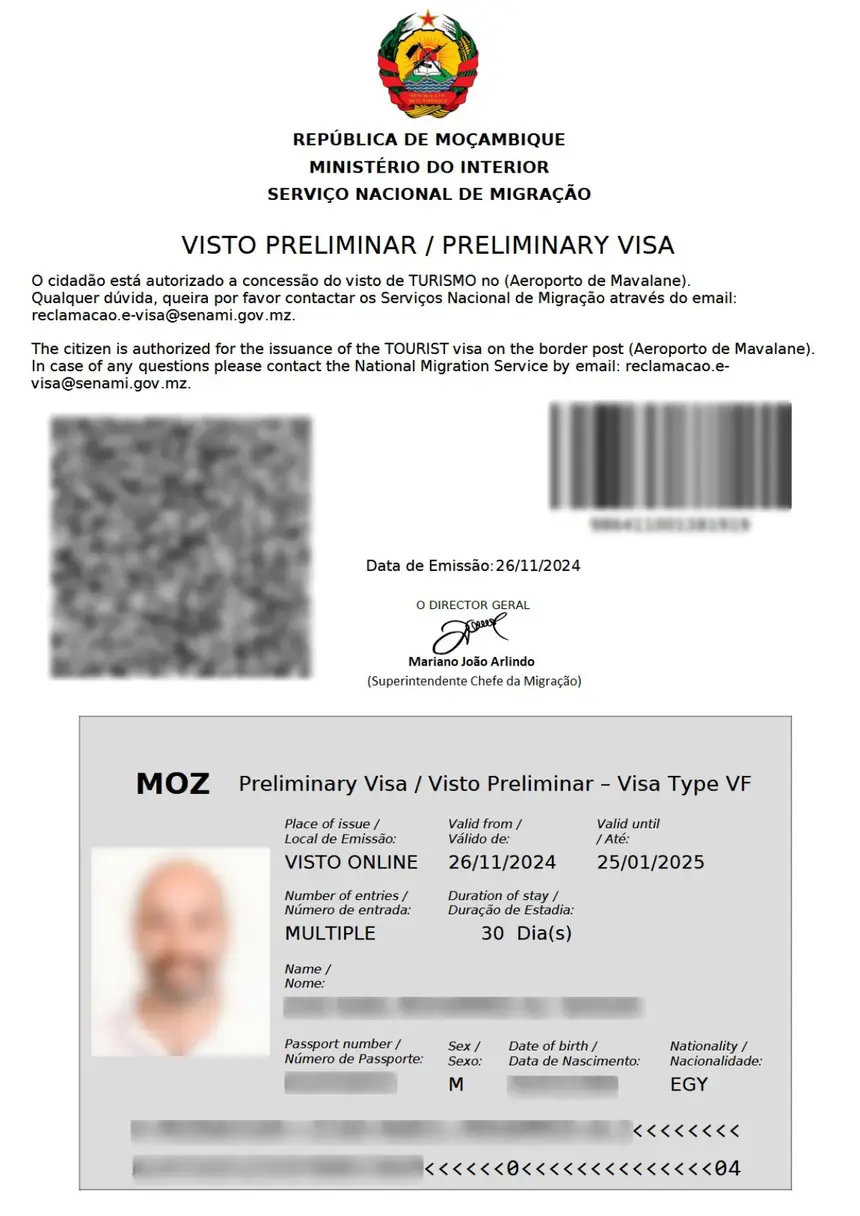
The mobile application produces the same result as a desktop submission: a Preliminary eVisa or eTA delivered via email as a downloadable PDF. There is no separate mobile app to install; the process runs entirely in the phone’s web browser.
Step-by-Step: How to Apply for a Mozambique eVisa From Your Phone
The mobile eVisa application follows four steps: visit the portal, submit documents, pay fees, and receive your eVisa by email. The entire process typically takes 15 to 30 minutes on a mobile device, assuming all documents are prepared in advance.
Step 1: Visit evisa.gov.mz on Your Mobile Browser
Open your phone’s web browser (Safari, Chrome, or Firefox) and navigate to evisa.gov.mz. The homepage loads with a mobile-optimized layout showing visa types and a “Apply Now” button. Select your visa category:
- Tourist eVisa — for leisure, vacation, and cultural visits (up to 90 days)
- Business eVisa — for meetings, conferences, and trade activities (up to 90 days)
- eTA — for visa-exempt nationals from 29 countries (up to 30 days)
- Investment eVisa — for investors with projects valued at $500,000 or more
- Sports and Culture eVisa — for competition or cultural event participants (up to 30 days)
- Humanitarian Assistance eVisa — for non-profit emergency work (up to 90 days)
- Crew eVisa — for airline or cruise ship crew members (up to 3 days)
Tip: If you hold dual nationality, use the passport you will travel with for the entire application.
Step 2: Complete the Application Form and Upload Documents
Fill in your personal details, travel information, and passport data. The mobile form uses large touch-friendly input fields and drop-down menus. For passport scanning, the portal can use your phone camera to auto-extract data from the biodata page, reducing manual entry errors.
Required documents for upload:
- Passport scan or photo — biodata page, clear and legible
- Passport-sized photo — recent colour photo, white background, no glasses (use the portal’s integrated editor for correct sizing)
- Proof of accommodation — hotel reservation or notarised invitation letter
- Return or onward flight ticket — confirmed booking
- Bank statement — recent statement showing sufficient funds
File requirements: Uploads must meet the portal’s file size and format specifications. Accepted formats typically include JPEG and PDF. The integrated photo editor helps resize images that exceed limits.
Step 3: Pay the Visa Fee
After submitting the application, proceed to the secure payment gateway. Fees are processed in USD. The mobile payment interface accepts major credit and debit cards (Visa, Mastercard, American Express).
Fee structure (approximate, via the online portal):
| Visa Type | Duration | Fee (USD) | Processing Time |
|---|---|---|---|
| eTA | 30 days | $97 total ($48 visa + $49 service) | 3-5 working days |
| Tourist eVisa | 60 days | $545 total ($346 visa + $199 service) | 7-10 working days |
| Tourist eVisa | 90 days | $749 total ($500 visa + $249 service) | 7-10 working days |
| Business eVisa | 60-90 days | $545-$749 | 7-10 working days |
| Investment eVisa | 90-365 days | $395-$1,260 | 7-10 working days |
Optional expedited processing:
- Rush processing: 5-7 working days, additional $59
- Super Rush processing: 3-5 working days, additional $99
All fees are non-refundable. Your bank may apply additional currency conversion charges.
Step 4: Receive and Print Your eVisa
Check your email for the Preliminary eVisa or eTA approval. Download the PDF attachment to your phone. You must print this document — immigration authorities require a physical copy for boarding and at the port of entry in Mozambique. If you do not have a printer while travelling, use a hotel business centre or local print shop.
The preliminary eVisa is an authorisation to travel, not the final visa. The actual visa stamp is issued at the Mozambique border upon arrival.
Mozambique eVisa Mobile Application Requirements
A valid passport with at least 6 months of remaining validity and a minimum of 2 blank pages is the primary requirement for a Mozambique eVisa application. All supporting documents must be digitised for upload through the mobile portal.
Complete requirements checklist:
- Passport: Valid for 6+ months from the date of entry, with at least 2 blank pages for visa stamps
- Passport photo: Recent colour photo, 2×2 inches, white background, no glasses or head coverings (unless for religious purposes)
- Accommodation proof: Confirmed hotel booking or a notarised invitation letter from a host in Mozambique
- Flight itinerary: Confirmed return or onward travel ticket
- Financial proof: Recent bank statement demonstrating sufficient means of subsistence during the stay
- Yellow Fever certificate: Required if arriving from a country with risk of Yellow Fever transmission
For minors (under 18):
- Parental consent letter from both parents or legal guardians
- Birth certificate copy
- Copies of parents’ passports
Portal exclusions: Nationals from Pakistan, Bangladesh, Ethiopia, Nigeria, Nepal, and Somalia cannot use the digital portal and must apply in person at a Mozambican embassy or consulate.
Mozambique eVisa Processing Times on Mobile
Standard eVisa processing takes 7 to 10 working days, regardless of whether you apply from a phone or desktop. The processing time depends on the selected speed tier, not the device used.
| Processing Tier | Timeline | Additional Cost |
|---|---|---|
| Standard | 7-10 working days | Included in fee |
| Rush | 5-7 working days | +$59 |
| Super Rush | 3-5 working days | +$99 |
| eTA (visa-exempt) | 3-5 working days | Included in fee |
The platform provides tracking capabilities so applicants can monitor their application status from their phone. Once approved, the eVisa arrives by email and can be downloaded directly to the mobile device.
Important: Apply at least 2 to 3 weeks before your intended travel date to allow time for processing and any potential follow-up requests. eTA applicants should apply at least 48 hours before departure.
Troubleshooting: Common Mobile Application Issues
Most mobile application problems stem from file upload errors, payment gateway timeouts, or browser compatibility issues. The portal’s 24/7 multilingual support team can assist with persistent technical problems.
Photo upload failures:
- Ensure the image meets file size limits (typically under 2MB)
- Use JPEG format for photos, PDF for documents
- Use the portal’s integrated photo editor to resize before uploading
- If the camera scanner fails to read the passport, manually enter the data
Payment issues:
- Disable VPN or pop-up blockers before initiating payment
- Ensure your card is enabled for international transactions in USD
- Try a different browser if the payment page does not load
- Contact your bank if the transaction is declined — some banks flag overseas online payments
Form submission errors:
- Check that all required fields are filled (marked with an asterisk)
- Ensure passport number matches exactly as printed on the biodata page
- Verify email address is correct — the eVisa is delivered by email only
- For dual nationals, use the same passport throughout the entire application
Browser compatibility:
- Use the latest version of Chrome, Safari, or Firefox on mobile
- Clear browser cache and cookies if the portal behaves unexpectedly
- Avoid using in-app browsers (from email or social media apps) — open in a standalone browser
Mozambique Mobile Visa Apply vs Embassy Application
The mobile eVisa portal is faster and more convenient than applying at a Mozambican embassy, but embassy applications remain necessary for excluded nationalities and certain visa types. The digital system eliminates in-person visits for most travellers from 183 eligible countries.
| Feature | Mobile eVisa Portal | Embassy Application |
|---|---|---|
| Availability | 24/7, from anywhere | Business hours only |
| Processing time | 7-10 working days (standard) | 10+ working days |
| Device requirement | Smartphone or tablet with internet | In-person visit required |
| Payment | Online credit/debit card (USD) | Cash or money order |
| Document upload | Digital upload from phone camera | Physical copies required |
| Tracking | Online status tracking | Phone or email enquiry |
| Eligible countries | 183 countries | All nationalities |
| Excluded nationals | Pakistan, Bangladesh, Ethiopia, Nigeria, Nepal, Somalia | All nationalities accepted |
Embassy fees differ from portal fees. For example, a single-entry 30-day visa through the Mozambique Embassy in Washington, DC costs $220 for standard processing (10 days) or $280 for expedited processing (3 days). A multiple-entry 90-day visa costs $240 (standard) or $310 (expedited).
FAQs About Mozambique Mobile Visa Apply
How do I get my eVisa on my phone?
After your Mozambique eVisa is approved, the Preliminary eVisa PDF is sent to the email address used during the application. Open the email on your phone, download the PDF attachment, and save it to your device. You must print this document before travel — immigration authorities require a physical copy at boarding and upon arrival.
Can I apply for a Mozambique visa entirely on my phone?
Yes. The evisa.gov.mz portal is fully responsive and supports the complete application process on mobile devices, including form filling, document upload, photo editing, and payment. No desktop computer or separate mobile app is required.
How long does it take to get a Mozambique eVisa on mobile?
Standard processing takes 7 to 10 working days. Rush processing (5-7 days, +$59) and Super Rush processing (3-5 days, +$99) are available for an additional fee. eTA applications for visa-exempt nationals process in 3 to 5 working days.
Do I need to print my Mozambique eVisa?
Yes. The Preliminary eVisa must be printed and presented as a physical document during boarding and at the Mozambique immigration counter. A digital copy on your phone is not accepted as the sole document.
What if my Mozambique eVisa application is rejected?
If your application is rejected, review the rejection reason provided in the email. Common reasons include incomplete documentation, unclear passport scans, or passport validity issues. You may reapply with corrected documents. Fees are non-refundable, so a new payment is required.
Can US citizens apply for a Mozambique visa on mobile?
Yes. US citizens can apply for a tourist eVisa ($545 for 60 days) or an eTA ($97 for 30 days) through the mobile portal. Alternatively, US citizens can apply through the Mozambique Embassy in Washington, DC.
Is there a Mozambique visa mobile app?
No. There is no dedicated mobile app for Mozambique eVisa applications. The process runs entirely through the mobile web browser at evisa.gov.mz. Be cautious of third-party apps claiming to offer Mozambique visa services — the official portal is the only authorised platform.
Can I track my Mozambique eVisa status on mobile?
Yes. The evisa.gov.mz portal includes a “Track Application” feature accessible from any mobile browser. Enter your application reference number and passport details to check the current processing status.